Three kinds of code
Start free. Go further when it matters.
Every code is a real, standard QR code that opens in any phone camera.
Standard
FreeClean, classic codes for anything you want to share.
- Links, text, Wi-Fi, email, phone, SMS and contact cards
- Custom colours, dot and corner styles
- PNG and SVG downloads
Image
1 creditYour logo or a picture in the centre, so people know it's you.
- Everything in standard
- Upload a logo or any picture
- PNG and SVG downloads
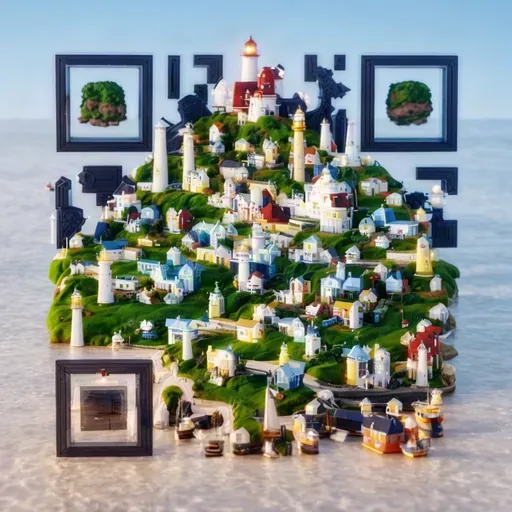
AI
5 creditsAn artistic image generated with your code built right into it.
- Every code is checked to make sure it scans
- Failed generations are refunded automatically
- PNG downloads
How it works
From sign-up to scannable in three steps.
Step 1
Create a free account
Sign up with your email. We send you a code to sign in, so there's no password.
Step 2
Design your code
Choose what it holds, then make it yours with colours, dot and corner styles, a logo or AI art.
Step 3
Download and share
Get a crisp PNG or SVG for print or screen. Every code you make stays in your library.
MCP
Ask your AI assistant for a code.
Every feature is available over MCP. Connect Claude, ChatGPT, Cursor or any MCP client, sign in once, and make codes without leaving the conversation.
Server URL
https://scandalous.codes/mcpSign in with OAuth. No API keys to manage.
Make a QR code for my Wi-Fi with our logo
Used Scandalous
Here's your Wi-Fi code with your logo in the centre. Guests can scan it to join without typing the password. It used 1 credit.
Home Wi-Fi
claude mcp add --transport http scandalous https://scandalous.codes/mcpPricing
Pay once. Use credits whenever.
Credits come in one-off packs and never expire. No subscription, no monthly fee.
Starter
£5one-off
50 credits · 10p per credit
- 50 image codes or 10 AI codes
- Mix and match as you go
- Credits never expire
Pro
Save 25%£15one-off
200 credits · 7.5p per credit
- 200 image codes or 40 AI codes
- Mix and match as you go
- Credits never expire
Studio
Save 51%£49one-off
1,000 credits · 4.9p per credit
- 1,000 image codes or 200 AI codes
- Mix and match as you go
- Credits never expire
Standard codes are always free
Create, style and download them without spending a credit. You only need credits for image and AI codes.
FAQ
Questions, answered.
Will my codes actually scan?
Yes. Every code follows the QR code standard and opens in any modern phone camera. AI codes are scanned and verified before they reach you. For the best results, keep strong contrast between the code and its background.
Do credits expire?
No. Credits never expire and there is no subscription. Buy a pack when you need one and use it at your own pace.
What happens if an AI generation fails?
If a generation fails or the result does not scan, the 5 credits go straight back to your balance automatically. You only pay for codes that work.
Which file formats can I download?
Standard and image codes download as PNG and SVG, so they stay sharp from business cards to billboards. AI codes download as PNG.
Can I use the codes commercially?
Yes. Use your codes on packaging, menus, posters, products and anywhere else you like.
Will my codes stop working?
No. Your content is stored in the code itself, with no redirects in between, so a printed code keeps working for as long as the link or details inside it do.
How do I use Scandalous from my AI assistant?
Add https://scandalous.codes/mcp as an MCP server or custom connector in Claude, ChatGPT, Cursor or any other MCP client, then sign in. Your assistant can then do everything the web app can, and every code lands in your library.
Do I need an account?
Yes, a free one. Sign up with your email and we send you a code to sign in. Your library keeps every code you make.
Your first code is free.
Sign up with your email and start making codes. Add a logo or AI art whenever you need it.
Get started for free