QR codes for flyers and posters
Anyone printing flyers or posters can add a QR code that opens a ticket page, a sign-up form or the venue on Google Maps, so readers don't have to type a web address off a lamp-post. A code can also dial a phone number, start a WhatsApp chat or play a band's latest songs, which suits lost pet posters, tradespeople's leaflets and gig posters alike. The code is fixed once it's printed, so point it at a page you can keep up to date and it will outlast the print run.
- TicketsWith logo
- DirectionsStandard
- Call meStandard
Use cases
What to put in each code, and the generator that makes it.
- Website
Tickets and sign-ups from the poster
A link code takes readers straight to your ticket page, Eventbrite listing or sign-up form. Print the short web address underneath as well, for anyone whose phone won't scan.
Website QR code generator - Google Maps
Directions to a hard-to-find venue
Village halls, pop-up shops and back-room gigs are easy to miss. A code that opens the location in Google Maps gets people to the right door, which matters most when they've never been there before.
Google Maps QR code generator - Phone
A code on every tear-off strip
Lost cat posters, cleaners and guitar teachers still rely on tear-off strips. A phone code on each strip dials you when scanned, and because a phone number is short, the pattern stays simple enough to print small.
Phone QR code generator - WhatsApp
Questions before people turn up
Running clubs, residents' associations and parent groups can link a noticeboard poster to a WhatsApp chat, so newcomers can ask what to bring before the first session. Use a number you're happy to share publicly.
WhatsApp QR code generator - Spotify
Hear the band at the bus stop
On a gig poster, a code linking to the band on Spotify lets someone listen while they wait, and decide there and then whether to buy a ticket.
Spotify QR code generator - AI art
Make the code part of the artwork
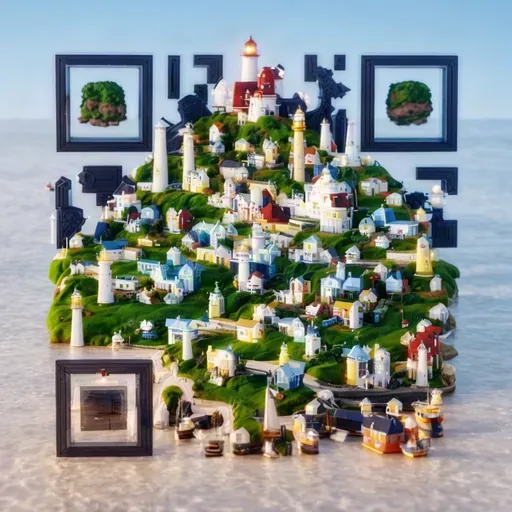
For club nights, exhibitions and festivals, an AI art code builds the QR pattern into an illustration, so the poster doesn't need a black square in the corner. Busy artwork scans less easily than a plain code, so test a printed proof first.
AI art QR code generator
Print and placement tips
How to size, place and print your codes so they scan first time.
- 01
Work from the reading distance
A rough rule is a code one tenth as wide as the distance it's read from. A flyer held in the hand needs about 2.5cm, a noticeboard poster that people step up to needs 5cm or more, and a poster in a shop window seen from across the pavement needs around 20cm.
Guide: What size should a QR code be? - 02
Mind the crease on folded leaflets
On a DL or folded A4 leaflet, a crease through the code can stop it scanning. Place it in the middle of a panel, at least 1cm from any fold or trim edge, and check the printer's template for where the folds fall.
- 03
Posters outdoors need more than paper
Rain wrinkles paper and smears ink across a code within days. For fences and lamp-posts, use laminated or synthetic paper with a matt finish so streetlights don't glare off it, and only put posters up where you have permission: councils can fine for fly-posting.
Guide: How to make a QR code that always scans - 04
Proof one copy before printing hundreds
Print a single copy at full size and scan it with an iPhone and an Android phone from where people will really stand. A wrong link can be fixed by editing the code's destination, but a code that's too small or too faint can't be fixed once 500 flyers have gone through letterboxes.
Guide: Static vs dynamic QR codes: which should you use? - 05
Tear-off strips can be tiny
Link codes hold a short Scandalous link however long your address is, so they stay simple enough to scan at tear-off strip sizes. Keep text and contact codes brief, as every extra character makes their pattern denser.
Which style to choose
Standard codes are free and print cleanly on photocopied flyers and black and white runs. A logo code (1 credit) puts a business or club logo in the middle of a leaflet code, which helps people trust a flyer that arrived through the letterbox. AI art codes (5 credits) suit gig, exhibition and festival posters printed in colour at A3 or larger, where the code can be part of the design rather than a box in the corner.
Common questions
Can I change the link after the flyers are printed?
Yes. Edit the code's destination in Scandalous and every printed flyer opens the new page. If the code points at your event page, you can also just update that page when the date or venue changes.
How can I tell which posters are working?
Make a separate code for each spot or batch, like one for the library noticeboard, and compare their scans in Scandalous. Standard codes are free, so extra codes cost nothing.
What file should I send to the print shop?
Download standard and logo codes as SVG. It's a vector file, so it stays sharp at any size, from a tear-off strip to an A0 poster. AI art codes are PNG only, so download the largest size and don't print it bigger than the proof you tested.
Does the code stop working after my event?
Not while the code is in your library. What can change is the page behind it: if the ticket page is deleted after the event, scans land on an error. Point the code at a page that says the event has finished, or gives the next date, and old posters stay useful.
Do I still need to print the web address?
It's worth it. Some people won't scan a code on a poster, and a short address underneath gives them another way in.
your first code is free.
sign up with your email and start making codes. add a logo or ai art whenever you need it.
get in, it's free